
Company Services Download
RecoSoft RecoSoft RecoSoft
    Marketplace

  PDF2Office Personal

 
Price - US$39.00

Click here to purchase

Trial version download


  PDF2Office Standard

  PDF2Office Pro


For Volume Discounts, please contact us at:
info@recosoft.com


Contact Information
Recosoft Corporation
Hommachi 1-5-6,
Chuo-ku,
Osaka, Japan
+81-6-6260-5547

Customer Support
support@recosoft.com


Microsoft Office Marketplace logo 

PDF2Office Personal v4.0

PDF2Office Personal is a PDF to Microsoft® Word conversion tool.

You can directly open PDF documents within Microsoft® Word.

Simply click on the Open PDF file button within Microsoft® Word and when the Open PDF File dialog appears, choose the PDF file to open and click okay. The PDF file appears as a fully editable Microsoft® Word document.

Seamless Integration with Microsoft® Word

Office 2007 integration

PDF2Office ribbon in Microsoft® Word 2007

Office 2000-2003 integration

PDF2Office toolbar and command in Microsoft® Word 2000-2003


PDF2Office Personal converts PDF documents into fully editable Microsoft® Word 97 - 2003 format recreating the intended construction and layout of the document.

PDF2Office Personal forms paragraphs, applies styles, regroups independent graphics elements, extracts images; creates tables; processes headers/footers, endnotes/footnotes and columns/sections automatically - without any intervention.

PDF2Office Personal also provides options for converting or extracting data from a range of pages in a PDF document. You can extract text or images, or convert the entire document to Microsoft® Word format.

PDF2Office Personal enables you to recover the data stored in PDF documents - making them available for use by anyone.

Features Summary

  • Open PDF documents directly in Microsoft® Word
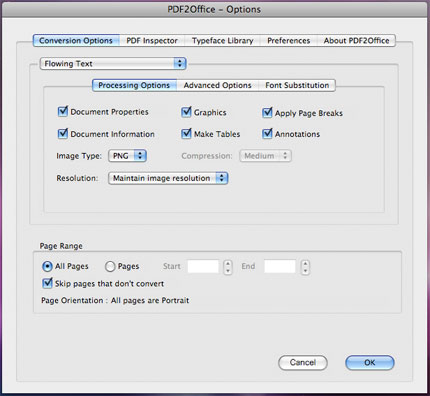
    PDF2Office Personal is a plug-in for Microsoft® Word that enables you to directly open PDF documents within Microsoft® Word.

  • Multi-Language/Asian Language Support
    Supports English, Japanese, Chinese, Korean and Western European-language data contained in PDF documents.

  • Click Open
    Right click on a PDF document on the desktop and have it open in Microsoft® Word.

  • Familiar Interface
    PDF2Office Personal uses standard Microsoft® Word interface for opening a PDF document - there is no need to learn anything new.

  • Seamless Integration
    PDF2Office Personal seamlessly integrates with Microsoft® Word and the Windows® desktop interface.

  • Password Protected PDF documents
    Open password protected PDF documents*.

  • Quick
    PDF2Office Personal converts the PDF document to Microsoft® Word format within seconds.

  • Extract Data
    Extract text, images and/or other data from specific pages.

*The original password is required to open password protected PDF documents.

System Requirements

    Hardware Platform: Microsoft® Windows® compatible machine with at least a 500Mhz Pentium® III processor.
    System: Microsoft® Windows® 2000, XP with SP2/SP3, 2003, Vista
    RAM : 512 MB installed in the computer.
    Others : Microsoft® Word 2000/XP/2003/2007

    Note: Layout reconstruction varies depending on document and may not be 100% accurate. Furthermore, certain types of PDF data are not supported including (but not limited to) transparencies, clipping paths, tilings/shadings, certain graphics operations, graphics filtering, certain text operations and PKCS/AES encrypted documents.

    Microsoft and the Office logo are trademarks or registered trademarks of Microsoft Corporation in the United States and/or other countries.

    PDF2Office is a registered trademark of Recosoft Corporation in the United States and/or other countries. All other trademarks are recognized and the property of the respective holder.

CareersContact UsFAQsRegister